Instant
Clipboard Sync
A lightweight desktop assistant that automatically saves everything you copy, expands text abbreviations instantly as you type, and mirrors your clipboard history across all your Windows devices in real-time.
 ClipboardProNative Windows v1.4.2
Copy Smarter. Paste Faster.
Save Hours Every Week.
ClipboardPro is a lightweight, offline-first productivity hub designed to keep you focused and speed up your daily typing.
Multi-Format Vault
Never lose a copied item. Instantly search, filter, and recall texts, high-res images, files, hex colors, and webpage links from a single dashboard.
Cursor Paste Bar
Press Ctrl+Shift+V to snap a mini-paste bar to your text cursor. Instantly paste items directly into your active window with zero clicks and zero lag.
QuickDrop Shelf
Drag text, links, or files to the screen edge to stash them temporarily. Keep files handy for quick access without cluttering your desktop.
Smart Helpers
Detects color codes to show visual badges, automatically formats messy JSON strings, and fetches web page titles in the background to clean up your dashboard.
Sensitive Masking
Automatically flags and hides passwords, credit cards, or API keys in your history. Use a simple eye toggle to reveal or hide them safely on your screen.
In-App Screenshot & Text Editor
Crop, annotate, and edit captured screenshots or modify clipboard text dynamically before pasting. A built-in toolbar keeps your quick edits seamless and productive.
Hotkey Text Expander
Define shortcuts (like :email) that automatically expand into full email templates or code blocks. Works instantly across all your apps.
Instant Local Sharing
Share your copied snippets and files between your workstation and laptop instantly. Discovers nearby devices automatically over local Wi-Fi with zero setup.
Modern Windows UI
Beautiful visual styling that perfectly matches Windows 11. Soft, translucent backdrops blend with your wallpaper for a clean, premium desktop look.
Built for Daily Productivity
A clipboard manager that respects your focus and your computer. Enjoy high-speed productivity without annoying background updates, cloud requirements, or resource drain.
Productivity Features
- Copy and organize text smartly — Auto-detects hex colors, formats messy JSON data, and fetches webpage titles.
- Instant download image — Save and extract image files directly from webpages.
- Custom Category — Keep your pinned snippets organized in custom folders..
- Instant Edit Text and picture — Crop and draw on screenshots or modify copied text before pasting.
- Instant Share — Beam clipboard content peer-to-peer over local network.
- Quick paste bar — Snap a mini horizontal paste bar next to your cursor with a single hotkey.
- Temporary shelf — Keep many file as temporary holder and paste in other place later .
- Instant Text expander — Expand keywords automatically into full templates.
- Shortcut key — Fully custom global system-wide triggers.
Under the Hood Performance
Instant Local Sync
Fast, direct computer-to-computer sync on your local network.
Instant Set Up
Activate instantly with a simple licensing key.
Smart Memory Control
Saves large items directly to your disk to keep system RAM low.
Sensitive Masking
Automatically hides passwords and API keys from view.
Custom Hotkeys
Register custom hotkeys to access clipboard history instantly.
Self-Cleaning Cache
Auto-cleans old items and prunes image history to save space.
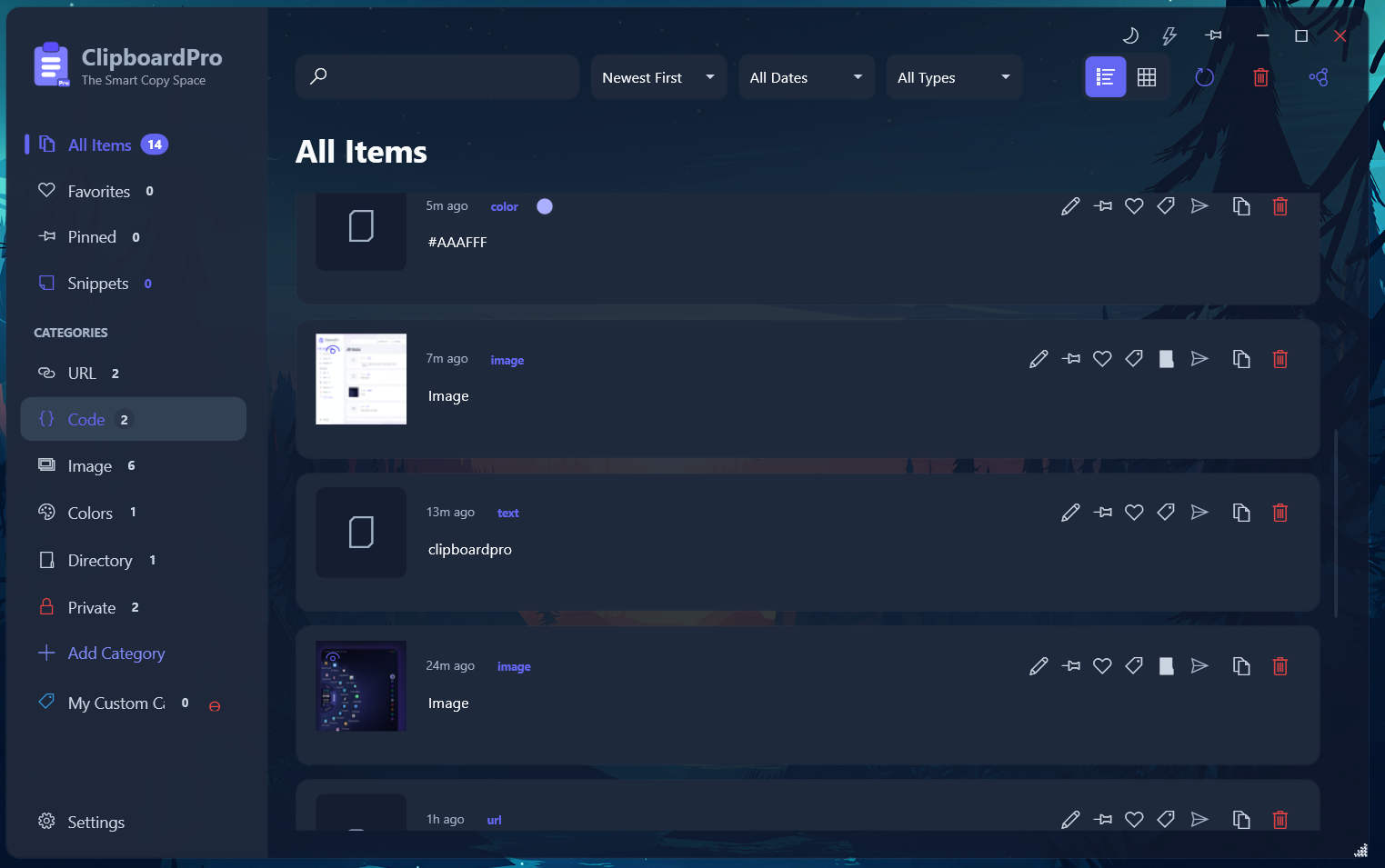
Actual Client UI
Take a look at the real high-fidelity WPF Fluent interface running live on Windows 10/11.
WPF Clipboard Vault
Local Database & Search
Query, sort, and search your clipboard history instantly. The WPF client automatically categorizes items into clear tabs for texts, high-res images, files, hex color codes, and web links.
Built Different
Cursor Paste Menu
Press Ctrl+Shift+V to snap a mini-paste bar right to your text cursor. Paste previous items instantly without breaking your concentration.
Temporary Drop Shelf
Drag files, links, or text to the screen edge to tuck them away. Collect multiple items and drag them out into any app in one go.
Smart Text Shortcuts
Set up trigger abbreviations (like :email) that expand into templates. Fill forms, signatures, and repetitive text blocks in milliseconds.
Content Auto-Detection
Instantly prettify copied JSON, visually preview hex colors, and view clean webpage titles instead of long, messy URL links.
Activate Your ClipboardPro License
Generate an instant trial key inside the dashboard simulator, or secure a permanent license key to synchronize without limits.
1-Month Free Trial
Test the native WPF C# desktop suite and high-speed local clipboard sync channel completely free for 30 days.
- Access to full desktop clipboard history
- P2P local sync under 100ms
- Offline local JSON & SSD cache
- Download and run instantly
- Smart privacy history filters
- No credit card or registration required
Yearly Pro License
Get an entire year of high-speed clipboard synchronization, priority updates, and dedicated customer support.
- Unlimited device sync streams
- Offline local JSON & SSD cache
- Instant history filter queries
- Smart privacy masking system
- Activate on up to 2 workstations
- Continuous WPF runtime updates
- Priority customer helpdesk
Lifetime License
Permanently unlock ClipboardPro on all your devices with lifetime updates and no recurring subscription fees.
- Lifetime unlimited sync channels
- Activate on up to 3 workstations
- Offline local JSON & SSD cache
- Instant history filter queries
- Smart privacy history filter
- Permanent developer update track
- Priority synchronization routing
What Users Are Saying
Perfect For
Every Workflow
Developers
Sync complex code blocks, terminal commands, and raw JSON packets between local workstations and servers instantly.
Remote Workers
Move rich text templates, documents, and link lists between workspace machines and laptops in under 100ms.
Writers & Creators
Stash templates, article drafts, and research snippets in the drag & drop shelf to organize all ideas in one place.
Power Users
Customize global system hotkeys, define text abbreviations, and ensure low memory consumption during background operation.
Supercharge Your
Clipboard Workflows
Install the native Windows client to experience high-speed peer-to-peer and cloud clipboard syncing with zero lag.
Windows 10/11 • 64-bit Core Installer • Easy Setup